
Dosto,
Aapne bhi shayad yeh socha hoga ki resume jitna stylish aur colorful hoga, utna acha lagega. Lekin sach yeh hai ki bahut baar skilled logo ka resume reject ho jata hai sirf formatting ki wajah se. Maine khud yeh mistake ki thi, aur baad mein realize kiya ki simple, clean resume hi interview ke door kholta hai.
Agar aap fresher ho ya experienced, yeh guide aapko step-by-step sikhayega resume kaise banaye, kaise banaye ATS friendly resume, aur kya karna chahiye aur kya nahi — sab kuch detail mein. Saath hi simple resume format, resume template options aur free resume builder aur online resume maker tools ki bhi baat karenge. Chaliye shuru karte hain.
📖 Real Story: Jab mera resume reject ho gaya tha 😅
Maine 2019 mein Delhi mein ek digital marketing agency mein pehli job apply ki thi. Bahut mehnat se Canva mein 3 page ka colorful resume banaya — graphics, icons, fancy fonts. Socha “itna stylish resume to select ho hi jayega” lekin kya hua? 15+ companies mein apply kiya, ek call nahi aayi.
Us time mujhe laga problem meri skills me hai, lekin baad me samajh aaya ki problem resume me thi. Maine sab kuch simple kiya: Arial font, sirf text, proper headings, aur job description ke keywords. Next week hi 2 interviews aaye. Tab se main yeh kehta hoon: “Resume simple nahi, smart banayein.”
Yahi mistake bahut logo ko costly pad jaati hai. Isliye is guide mein main wo sab kuch bata raha hoon jo maine seekha — taaki aap woh mistakes na karo.
Resume kya hai? (Agar simple words mein bolu)
Resume matlab apni pehchaan ka ek page. Isme aap batate ho ki aap kaun ho, kya jaante ho, aur kya kar sakte ho. Employer ko aapke baare mein pehli impression yahi se milti hai. Mera khud ka experience – jab maine resume ko simple aur relevant banaya, toh responses double ho gaye. Isliye kehta hoon: resume ko apna first impression samjho, jitna neat, utna professional.
💡 Meri personal advice: Resume ko apna “first impression” samjho. Jitna neat hoga, utna professional lagega. Bahut log yeh line ignore kar dete hain, par yahi sabse important hai.
Pehle kya ready karna chahiye?
Maine yeh mistake ki thi – bina saari information collect kiye seedha template fill karna shuru kar diya. Fir baad mein confusion hoti hai. Toh pehle yeh sab ready rakhna:
- Apni details — naam, phone, email, address, LinkedIn link
- Education certificates — 10th, 12th, graduation, PG ke saal aur percentage
- Skills list — jo aati hai, chahe technical ho ya soft skills
- Experience details — Ismein job title, company ka naam, kab join kiya aur kab choda, aur sabse important — aapne wahan actually kya kya kiya, woh sab daalna mat bhoolna.
- Achievements — certificates, awards, projects, internships
📌 Tip: Ek baar yeh sab Google Keep ya notepad mein collect kar lo, fir resume format mein fill karna easy ho jayega.
Ab theory ho gayi, ab practical steps dekhte hain. Main try karunga ki simple words mein sab samjha doon.
Step-by-Step: Resume Kaise Banaye (Practical)
Ab main step-by-step bata raha hoon ki resume kaise banaye — chahe aap fresher ho ya experienced. Dhyan rakhein ki har step sahi se follow ho. Agar aap resume for freshers bana rahe ho, to projects aur internships pe extra focus karna.
Step 1: Format Decide Kare
Sabse pehle decide karo ki simple resume format chahiye ya koi special. Reverse-chronological format sabse common hai — isme pehle latest experience, phir purana. Agar experience kam hai, toh functional format bhi chal sakta hai. Meri recommendation: reverse-chronological hi use karo, kyunki ATS bhi ise zyada prefer karta hai.
Step 2: Personal Details (Top Section)
Top par likho:
- Full Name (bold mein, thoda bada font)
- Phone Number (agar abroad apply kar rahe hain to country code add karna na bhule.)
- Email ID (professional wala — name.wala@gmail.com)
- City/Location
- LinkedIn Profile (optional but highly recommended)
❌ Galti mat karna: Email ID mat likhna jo ajeeb ho jaise coolboy123@gmail.com — yeh unprofessional lagta hai. Seriously, isse pehle mujhe bhi yeh mistake karte dekha hai 😅
Step 3: Professional Summary (Career Objective Ka Naya Version)
Pehle log “career objective” likhte the. Ab professional summary zyada effective hai. Yeh 2-3 lines mein aapka USP batata hai.
Fresher ke liye example:
“B.Com khatam kiya hai abhi. MS Office aur Tally dono use karta hoon regularly. Chahta hoon ki pehli job accounting ya admin mein mile jahan kaam karte karte seekhne ka mauka bhi mile.”
Experienced ke liye example:
“3 saal se digital marketing kar raha hoon — SEO, Google Ads aur content strategy mein kaam kiya hai. Pichli company mein organic traffic 60% badhaya. Ab aisi company mein jaana chahta hoon jahan aur grow kar sakoon.”
Career change ke liye example:
“4 saal tak padhaya hai, ab corporate training mein aana chahti hoon. Logon ko samjhana aur content banana — dono mein comfortable hoon. HR ya L&D mein pehla mauka dhundh rahi hoon.”
Yeh paragraph 20–30 seconds mein employer ko bata dega ki aap kaun ho aur kya chahiye. Log yahan copy-paste karte hain, lekin customize karna better hai.
Step 4: Work Experience (Important for Experienced)
Agar experience hai to company name, role, duration aur responsibilities likho. Bullet points mein likhna best hai. Har point action verb se start karo (Managed, Created, Achieved).
Example:
— Digital Marketing Executive — XYZ Pvt Ltd (Jan 2023 – Present)
• Managed SEO strategy for 5+ websites, resulting in 45% traffic growth.
• Handled Google Ads campaign with ₹2L monthly budget, achieved 3x ROAS.
• Created 50+ high-quality backlinks, improving domain authority from 20 to 35.
Agar fresher ho to internships, projects, ya college ke roles yahan mention kar sakte ho.
Step 5: Education (Jitna Latest, Pehle)
Degree, college, passing year, percentage/CGPA likho. Agar marks kam hain to percentage mat likho, bas degree likh do. Always list latest education first.
Example:
— B.Com — Delhi University, 2024 — 72%
— 12th — CBSE Board, 2021 — 80%
— 10th — CBSE Board, 2019 — 85%
Step 6: Skills – technical aur soft dono alag alag likho
Skills ko two parts mein divide karo:
- Technical Skills: MS Excel, Tally, Canva, Python, SEO, Google Analytics (jo relevant ho)
- Soft Skills: Baat karna aata hai — chahe team meeting ho ya client call. Group mein kaam karna mujhe pasand hai, aur jab koi problem aaye toh seedha solution dhundta hoon, bhaagta nahi. Deadlines ka pressure samajhta hoon isliye pehle se plan karta hoon. Aur agar team ko lead karna pade toh woh bhi kar leta hoon.
💡 Meri tip: Job description ko copy karo, apni skills se compare karo, jo match ho woh resume mein daalo. 5 minute ka kaam, double interview calls. ATS friendly resume banane ka yahi simple formula hai.
Step 7: Achievements & Certifications
Agar koi certificate hai — jaise Google Course, NPTEL, Udemy, ya koi award — to jaroor likho. Ye dikhata hai ki aap khud ko update karte ho.
Example:
— Google Digital Marketing Certificate — 2025
— Best Student Award — College Fest 2024
— Completed Python for Everybody (Coursera) — 2024
Step 8: Projects aur Internships – Freshers Ke Liye Ye Section Bohot Matter Karta Hai
Agar experience nahi hai to projects aur internships ko highlight karo. Chahe wo college project ho ya online internship, sab relevant hota hai. Interview tips ke liye bhi projects se aapko confidence milta hai.
Example:
— E-commerce Website Project — Built basic e-commerce site using HTML, CSS, JavaScript. (college project)
— Digital Marketing Intern — Handled social media accounts for a local business, increased followers by 30% in 3 months.
— Data Analysis Project — Company ka sales data liya, Python mein process kiya, aur jo patterns mile unhe simple charts mein dikhaya taaki management asaani se samajh sake.
✅ Freshers ko projects aur internships se hi pehchan milti hai. Isliye inko achhe se likho. Yaha log ignore kar dete hain, par yahi game changer hai.
ATS Friendly Resume – Kya hai aur kyun zaroori?
ATS matlab Applicant Tracking System. Jobscan ke ek study ke according, 98% Fortune 500 companies ATS use karti hain aur unfiltered resumes rarely human tak pahunchte hain. Isliye ats resume checker tools use karke ats score improve karna zaroori hai. Ek ats friendly resume template use karo jo machine padh sake. Agar interview ke liye bhi taiyari karni hai, toh Interview Tips article bhi padho.
ATS friendly resume kaise banaye:
- Simple fonts use karo – Arial, Calibri, Lato.
- No images, no graphics, no tables – machine inhe padh nahi paati.
- PDF ya Word – dono acceptable hain, but PDF safe hai.
- Job description keywords match karo. Agar JD mein “SEO” likha hai to aapne bhi SEO mention kiya hai kya?
- Standard headings use karo – Work Experience, Education, Skills.
Maine khud dekha hai jab maine resume ko ATS-friendly banaya, to call back rate almost double ho gayi. Toh isko seriously lo. Aaj kal bahut saare online resume maker tools bhi ats score check karne ka option dete hain. Kuch free ats resume checker bhi available hain jo bata sakte hain ki aapka resume kitna score karega.
Maine personally jab apna resume ATS optimized kiya, tabhi mujhe pehli baar shortlisting mili. Tab samajh aaya ki sirf skills kaafi nahi, presentation bhi matter karta hai.

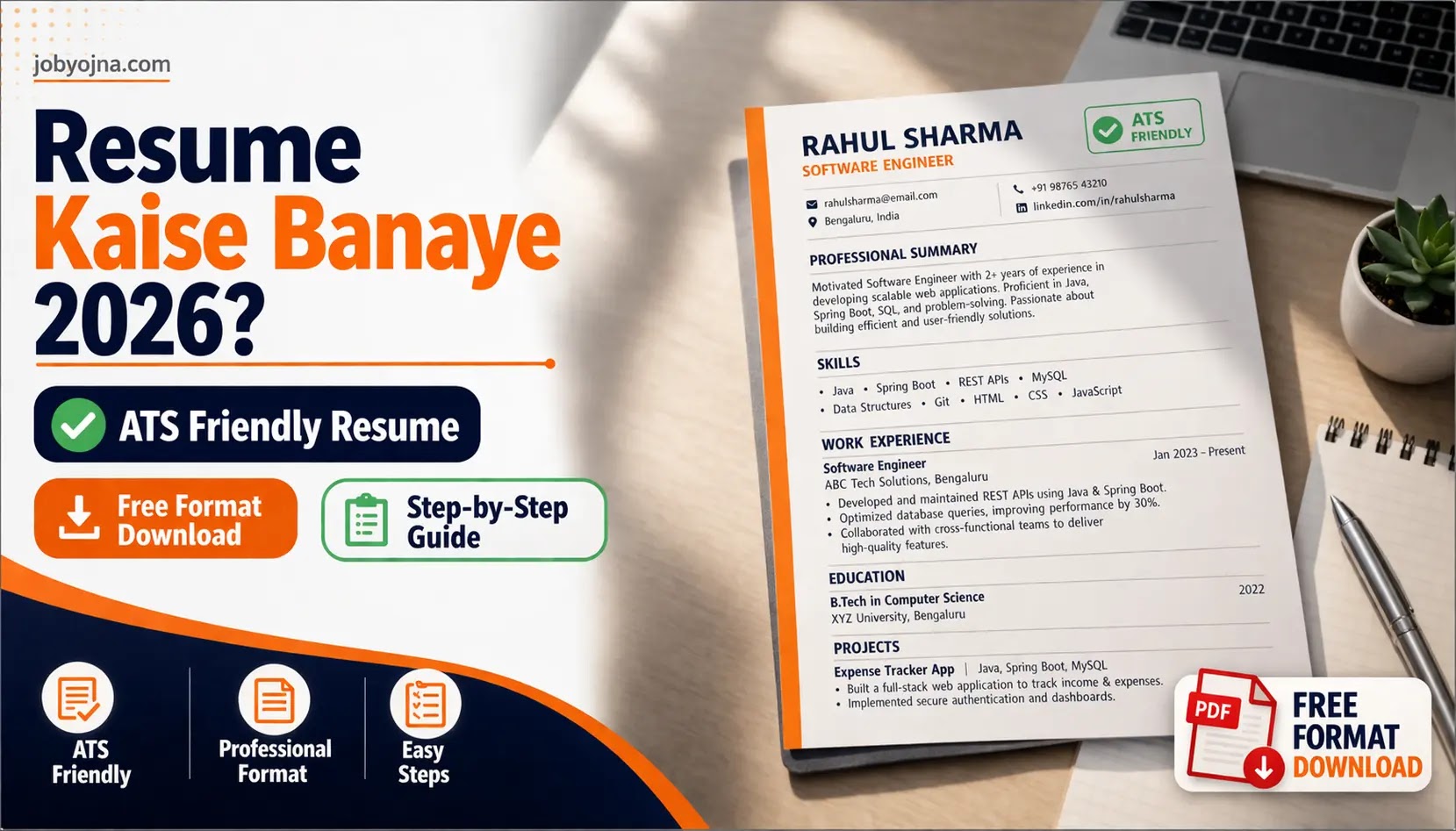
Example of a clean, ATS‑friendly resume format – fill your details.
Free Resume Format Download – ATS Friendly Template
Agar aap jaldi se free resume format download karna chahte ho, to niche diye link se aap simple resume format le sakte ho. Ye format ATS-friendly hai aur aap apni details fill karke turant use kar sakte ho. Yeh resume template specially designed hai freshers aur experienced dono ke liye. Bas download karo, apni information fill karo, aur job apply karna start karo.
Fresher vs Experienced Resume – Kya Difference Hai?
🎓 Fresher Resume (How to make resume for freshers)
- Focus: Education, Skills, Projects, Internships
- Length: 1 page maximum
- Summary type: Career objective / fresher mindset
- Experience section: Internships, college roles, projects
💼 Experienced Resume
- Focus: Work Experience, Achievements, Results (numbers)
- Length: 1–2 pages (prefer 1 if less than 5 years experience)
- Summary type: Professional summary with quantified results
- Experience section: Job roles, promotions, measurable impact
Latest Resume Trends 2026
Job market fast change ho raha hai. Agar 2026 mein bhi relevant rehna hai, to in trends ko follow karo:
- Skills-based resume — companies ab skills pe zyada focus kar rahi hain. Apni skills ko prominently show karo.
- AI + ATS optimization — ab resume AI tools se bhi scan hota hai. Keywords aur formatting pe dhyan do.
- Short resume (1 page) — zyada preferred hai. Experienced bhi 2 page se zyada avoid karo.
-
Quantified achievements likho — jaise ‘increased sales by 30%’, na ki ‘responsible for sales’. Numbers se farak padhta hai.
- LinkedIn integration — resume ke saath LinkedIn profile link jaroor do. Recruiters check karte hain.
Kuch Galtiyan Jo Log Usually Karte Hain — Aap Unse Bachein
Main khud yeh mistakes kar chuka hoon aur baad mein realize kiya:
- Typos aur grammar mistakes — ek baar spell check jaroor karo.
- Too fancy design — colorful resume ATS reject kar deta hai.
- Bahut lamba resume — 2 page se zyada avoid karo.
- Irrelevant info — apni 10th ke marks percentage nahi likhni hai agar aap graduate ho.
- Same resume sab jagah — har job ke hisaab se customize karo.
Free Resume Builder & Online Resume Maker – Kaunsa Use Karein?
Agar aap free resume builder ya online resume maker dhundh rahe ho, to kuch achhe tools hain jo main khud use karta hoon. Ye beginners ke liye kaafi helpful hain:
- Canva — visually attractive resume template milte hain (resume template free bhi available hai)
- Google Docs — simple aur professional simple resume format built-in hain
- Resume.com — ats friendly resume template free mein, saath hi resume builder free option
In online resume maker tools se aap kuch minutes mein professional resume bana sakte ho. Bas apni details fill karo aur PDF download karo. Agar aap resume maker online search kar rahe ho, to ye teen options best hain.
FAQs – Resume Kaise Banaye
- Resume kitne page ka hona chahiye?
Fresher ke liye 1 page, experienced ke liye 1–2 page best hai. Agar aapke paas 5+ years experience hai to 2 page chal sakta hai, warna 1 page hi rakho. - ATS friendly resume kya hota hai?
Aisa resume jo software easily read kar sake aur keywords match kare. Isme simple formatting, no images, aur standard headings use hote hain. - Kya free me resume bana sakte hain?
Haan, Canva, Google Docs, aur Resume.com jaise tools se free me professional resume bana sakte hain. Bas apni details fill karo aur PDF download karo. - Resume me photo lagana chahiye?
Generally nahi, kyunki ATS systems images scan nahi kar paate. Agar company specifically maange to lagao, warna avoid karo. - Resume kaise send kare?
Hamesha PDF format mein bhejo, taki formatting same rahe. File name rakho: “YourName_Resume.pdf”.
Conclusion – Ab Aapki Bari
Dosto, ab aapko pata chal gaya resume kaise banaye step by step. Chahe aap fresher ho ya experienced, ab aapke paas ATS friendly resume banane ka complete roadmap hai. Bas itna yaad rakho:
- Resume clear, simple aur relevant hona chahiye.
- ATS friendly resume format use karo.
- Har job ke liye customize karo.
- Achievements ko numbers mein likho.
Agar aap fresher ho to: Projects aur internships pe focus karo — yehi how to make resume for freshers ka secret hai.
Agar experienced ho to: Results aur numbers highlight karo.
Agar aapko lagta hai ki aapka resume abhi weak hai, to free resume builder tools se banao ya kisi expert se review karwa lo. Ek achha resume aapka interview door khol sakta hai.
Aapki dream job ke liye ek achha resume pehla step hai. Ab banana start karo. Agar job dhundhne ke aur tareeke jaanne hain, toh Online Paise Kamaye article bhi padho.
👉 Sach bolun to ek strong resume hi aapko interview tak le jaata hai – baaki sab baad me aata hai.
📢
Follow Us for Latest Job Updates & Career Guide
🚀 Daily job alerts, exam updates, interview tips, and career roadmaps — all in one place.





Yeh Bhi Padhna (Related Articles)
Agar aapko aur madad chahiye job search mein, to yeh articles jaroor padho:
- Highest Paying Jobs in India 2026 – Complete Guide (Salary & Scope)
- Job Interview Tips – Kaise Crack Kare First Attempt Mein (Expert Advice)
- Online Paise Kaise Kamaye – Beginners Guide (10+ Real Ways)
- Resume Format Download – Free ATS Friendly Templates